
Inbox Simulations
A simulation-based assessment of judgment, not recall.
Each person steps into a role and works a realistic inbox of competing demands. It runs on its own in any course or program. Every decision they make is measured, so judgment becomes evidence you can compare across a class or a cohort.
See it run on a real scenario.
Trusted in university classrooms and Fortune 500 leadership programs.
“We're 12% short for Q3 and the board meets Friday. I need your call by end of day — what do we do?”
Three ways to get one
Off the shelf, built by you, or built with you.
Every inbox runs on the same CapsimInbox platform. Start in minutes, or tailor it to your exact role and competencies.
Pick one from the library
Proven, ready-to-use inboxes across leadership, management, and core business concepts, live in minutes.
Author it, no code
If you can write an email, you can build an inbox simulation. Take real situations from your team, de-identify them, and create your own. Start free, and only pay when you deploy.
Start building free →Have Capsim build it
Built by Capsim's I-O psychologists with your subject-matter experts, around your roles, scenarios, and competencies, in weeks.
Talk to sales →Knowing vs doing
Knowing the material is one thing. Deciding what to do is another.
A knowledge test can show what someone remembers. CapsimInbox puts them in situations where the information is incomplete, the priorities compete, and they have to choose a response. Their decisions show how they apply what they know.
overall
- Organizing
- Leading
- Problem-solving
- Communicating
✓Behavioral evidence, not a self-report
It's evidence of how someone applies what they know, not just what they remember.
How it works
One role. One inbox. One decision at a time.
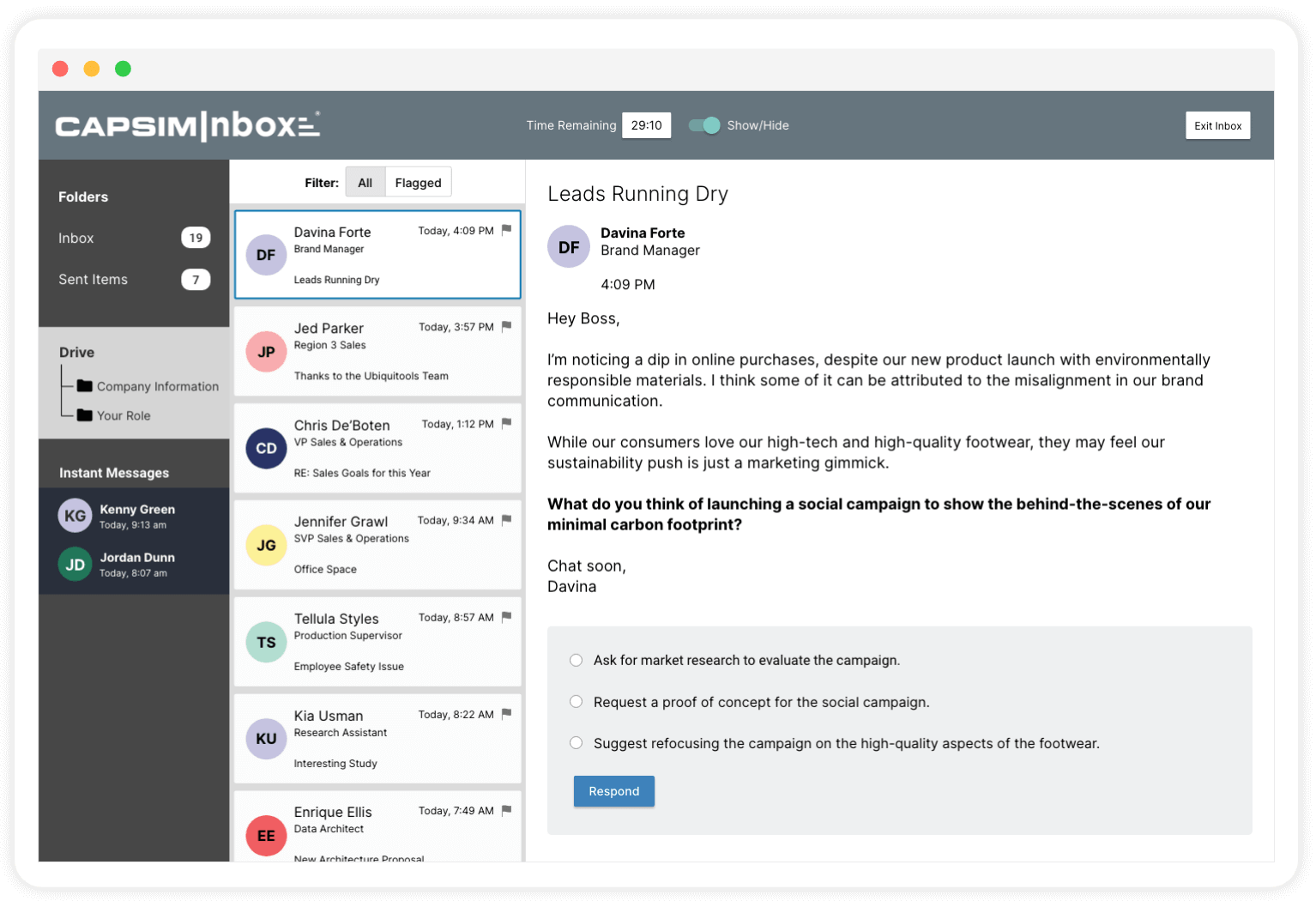
The participant steps into a role and works a realistic inbox, competing priorities, incomplete information, a clock. Every choice they make is measured. What you get back is a score, and a read on how they decide.
- 1
Step into a role
They become the manager, a brand lead, a department head, a director. The inbox is theirs now.
- 2
Work a real inbox
Emails, instant messages, and documents arrive, some urgent, some noise, none with a clean answer.
- 3
Make the call
For each situation, they choose how to respond: in context, under time, with trade-offs that don't resolve cleanly.
- 4
Every decision is scored
No option is obviously right. Each response is scored against a key built by subject-matter experts, and one call can lift some skills while costing others, the trade-off a real manager lives with.
✓ You don't just get a score. You see the decisions behind it.
Why it works
Recognition isn't judgment.
Real decisions rarely come with a clean answer. CapsimInbox puts people in situations where priorities compete, information is incomplete, and every choice comes with a cost.
No obvious right call
Incomplete information and competing stakeholders. Nothing in the inbox tells them which call is the right one.
Every option has a cost
One response can satisfy one priority and cost another. The scoring captures that: a single call can move several skills at once, up and down.
It all goes on the record
In inboxes that branch, earlier decisions change what arrives next, and none of them reset. The path they choose is the path they're measured on.
Every call is recorded and scored. The evidence comes from the decisions people make in the simulation, not just what they can recall.
The evidence
Measurement you can defend.
CapsimInbox is a situational judgment assessment built by industrial-organizational psychologists. Our published validation research covers specific ready-made inboxes: General Management, People Management, and Ethical Decision Making.
Read the technical synopsis (PDF) →
“It's the ultimate validation of your training efforts — to be able to say, here's where we were, and here's where we are now. Most of our training is technical, where the change is easy to see. With CapsimInbox, you can see the results even when they're not.”
Microsoft measured roughly 60 of its highest-ranking engineers before and after the program, across 14 countries, and several were promoted into people-manager roles.
Used by teams at Microsoft and Caterpillar, and in classrooms at Michigan State and the University of Florida.
For the participant
Turn their decisions into a report, and a plan.
The moment they're done, each participant gets an individualized read on how they actually decided, their judgment in context, the blind spots they didn't see, and a guided plan to close them.
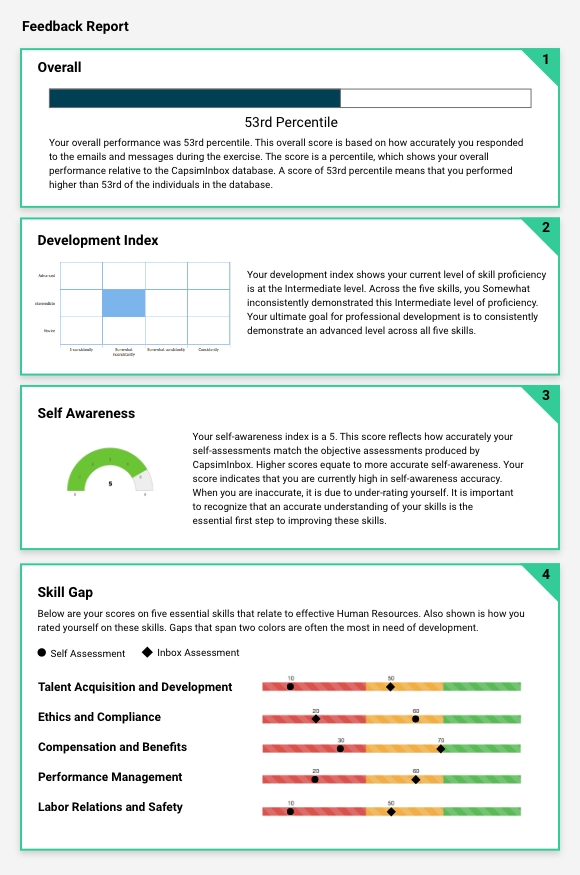
- Overall percentileWhere they rank against other participants who took the same inbox, or just your org.
- Development indexHow proficient their decisions were, and how consistently across the scenario.
- Self-awareness gaugeTheir own self-rating, set against how they actually performed.
- Skill-gap analysisStrengths and the specific skills to develop, self-rating versus actual.
- IDP BuilderA guided development plan with concrete tactics to improve their weakest areas.
For instructors and program leaders
Evidence of judgment, at every level.
Every decision becomes evidence you can act on, from one participant up to the whole cohort. Scores are also ranked against other participants who took the same inbox. Once connected to your LMS, export results in one click.
Start with one person
Every participant gets a full result, scored skill by skill, with the blind spots they didn't see.
- Overall percentile and development index
- Strengths and gaps, by skill
- Self-awareness: their rating vs reality
- 85Organizing
- 80Leading
- 72Problem-solving
- 78Communicating
- 83Initiating
Roll up to the cohort
Every participant in one view, the class average, and exactly where each person lands.
- Class-average percentile and skill scores
- Every participant ranked, side by side
- Spot the cohort's collective gaps
| Participant | Overall | Self-aware | Development |
|---|---|---|---|
| Rivera, A. | 82 | 4 | Advanced |
| Chen, J. | 74 | 5 | Advanced |
| Patel, S. | 69 | 3 | Intermediate |
| Okafor, M. | 61 | 4 | Intermediate |
| Brazier, J. | 54 | 2 | Developing |
…up to the whole population
See how your cohort compares with other participants who took the same inbox.
- Ranked against others who took the same inbox
- Percentile rank at a glance
- Consistent, expert-keyed scoring you can defend
Outperforms 65% of others who took this inbox.
Where it fits
Wherever you develop people.
Use it in your courses
Let intro students practice a core concept in a short inbox, then talk it through in class. Measure judgment in upper-level courses, and gather the assurance-of-learning evidence accreditors ask for.
Faculty & administrators Explore for higher ed → For corporate L&DAssess & develop your leaders
Measure leadership and role-specific skills, surface high-potentials, and prove training impact.
Talent & leadership teams Explore leadership assessment →FAQ
Inbox simulations, answered.
What is an inbox simulation?
An inbox simulation drops a participant into a role and a realistic email inbox, messages from colleagues, the board, and customers, and asks how they'd respond. It's a modern, software-scaled take on the in-basket exercises long used in assessment centers: a day-in-the-life that measures the decisions someone makes, not what they can recall.
How is it scored?
Against a key built by subject-matter experts. They rate the possible responses to each situation ahead of time (the critical-incident method), so some responses earn points, some earn none, and a few cost points. A single decision can raise some skills while lowering others, the same trade-offs a real role carries. Every choice is scored against that key. Scores are also ranked against other participants who took the same inbox. It's auto-scored for consistency at scale, not AI-scored.
Is CapsimInbox validated?
The ready-made management inboxes are. CapsimInbox is a situational judgment assessment built by four PhD industrial-organizational psychologists. In a 398-person study, scores on the General Management and People Management inboxes correlated with supervisors' ratings of job performance at r = .43. The published benchmark for assessment centers is .37. Test-retest reliability runs .86 to .93. That study was done on those two inboxes, so its results apply to them, and not to a custom inbox or one you author yourself. Read the technical synopsis (PDF) →
How long does an inbox simulation take?
Most ready-made inboxes run 30 to 60 minutes, across roughly 20 to 30 scenarios. Short role-preview versions can be as little as 5 to 10 minutes.
Where does it fit in a program, and is it academic or corporate?
Both, and across the curriculum. Faculty use community-created inboxes that span the whole program, gateway inboxes for core concepts in intro courses, and targeted judgment inboxes, like ethical decision-making, that upper-level and capstone faculty add to their courses. For a full strategy capstone, Capsim's team business simulation is the run-a-company experience, and CapsimInbox-XM pairs with it to measure each student individually for assurance of learning. Companies use it to assess leadership and role-specific skills, and prove training impact.
Can we customize it, or build our own?
Yes. Start with a ready-made inbox from the library, build your own in the no-code authoring platform (if you can write an email, you can build one), or have Capsim build a custom version with your subject-matter experts.
Does it work with our LMS?
Yes. Single sign-on and data flow through SCORM and xAPI, with Canvas, Cornerstone, Moodle and other major systems. It's available in any language.
What's the difference between CapsimInbox and CapsimInbox-XM?
CapsimInbox is the inbox-assessment platform on this page. CapsimInbox-XM is the assurance-of-learning version that pairs with the team business simulations to measure each student individually.
Enterprise-ready
Built to meet your standards.
See how your people make the call.
Book a 30-minute demo, tell us the role you're preparing people for, and we'll show you the inbox that measures it.